 RSS/Atom
Roomba in 2026
Eventually, any serious IT conversation ends up with a discussion about robot vacuum cleaners
I bought my Roomba 980 10 years ago and it still works fine, although some of the plastic parts have started breaking and its loud as hell. Sadly, Roomba recently went bankrupt - who knows what effect this will have on the Roomba app and privacy, or if the app will even continue to work at all.
With this in mind I searched for a modern replacement with good privacy controls and drew a blank. Most manufacturers have mandated cloud control for their new devices. There’s just no way I’m spending almost $2000 on a new robot that doesn’t respect privacy. I did find two exceptions:
- Valetudo - An outstanding project from the author and clearly a labour of love. As much as I wanted to give this a go, I’ve just got too much going on to hunt down a compatible model, crack open the case and then hookup a serial programmer while also being careful to prevent any future firmware updates. If I already had a compatible robot I’d totally install this but buying into this ecosystem with activly hostile manufacturers is not something I’m willing to pay for.
- Matic - Promising. It claims to work locally instead of requiring cloud, but not open source, too big to clean under the bed, expensive and requires vacuum bags only available from Matic.
Fixing up the Roomba
I decided to just fixup and secure the Roomba, and integrate it properly with Home Assistant.
Firewall ports
Roomba documentation reproduced here, for your convenience:
Internal Network Traffic
- UDP port 5353/5678 for discovery.
- TCP/HTTPS 443 for data traffic.
- TCP/MQTT 8080/8883 for data traffic.
Outbound Traffic to the Internet
- UDP/SNTP port 123 for time.
- TCP/HTTPS 443 (/80) for data traffic.
- TCP/MQTT 8080/8883 for data traffic.
- UDP/TCP port 53 for DNS.
Repairs
I made a Roomba 980 collection on Printables.com and 3D printed replacement parts I needed, then ordered a new front wheel for $5 on Ali Express and a bag of spare rollers and filters for $20 on Amazon.
That covers all physical needs and the robot is back to tip-top condition.
Network Security Setup
With the decision made that this robot is function complete and I’m not interested in maps, I decided to to cut the robot off from the Internet completely and just allow it access to NTP and DNS.
I have a complex setup spanning managed devices and routers but essentially what’s needed to do this is:
Omada (wifi and switches)
hellVLAN to completely isolate traffic- WIFI access point called
hell, mapped to corresponding VLAN - Modify trunk ports to carry
hellVLAN, and allow Home Assistant to reachhellon its LAN port
OPNsense (router)
- Interface for
hell - Device mapping for
hell - DHCP server for
hell - Firewall rules for
hell
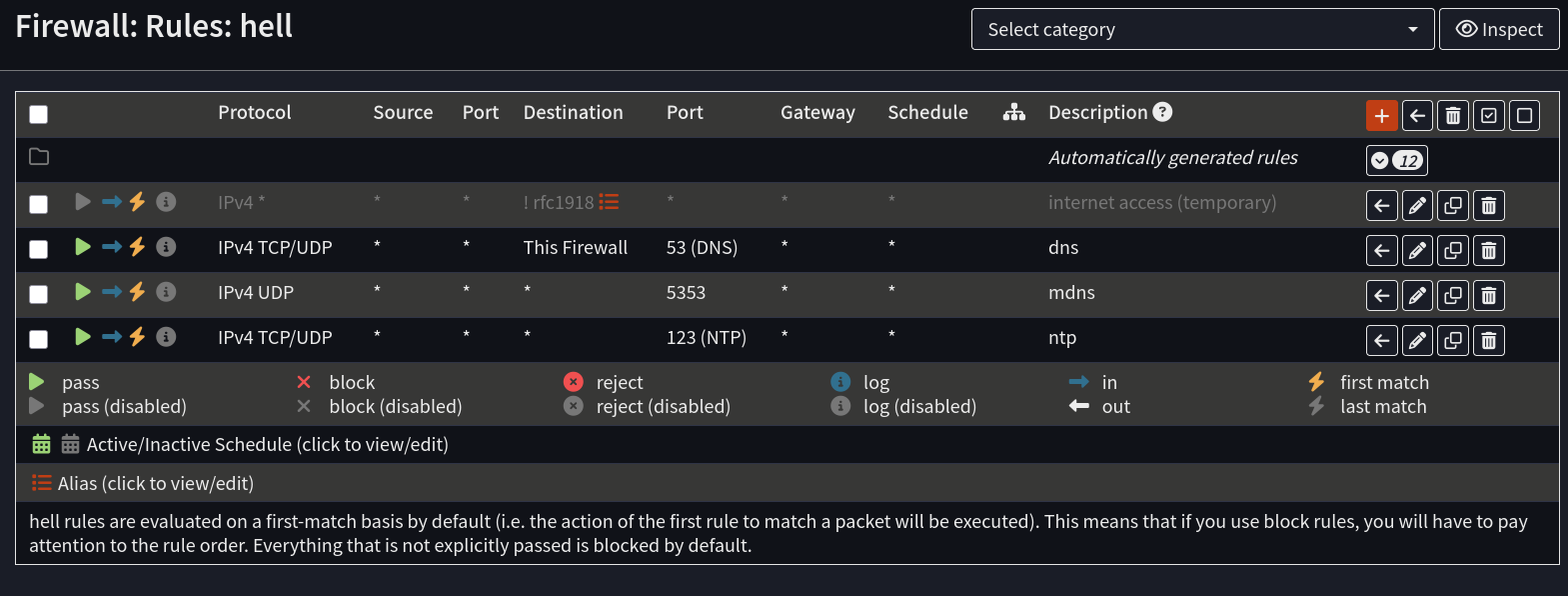
The disabled rule at the top is to temporarily allow internet access when onboarding the robot with the app.
Robot/App
Temporarily allow internet access in firewall, then either factory reset or change access point to hell in the app.
When the app says things are working, force close the app so that Home Assistant will be able to connect.
Back in your firewall, assign a static IP address to the robot.
Home Assistant
Home assistant provides a Roomba integration that works very nicely.
Even with mDNS forwarding now working, the Roomba is not detectable on a separate VLAN as it the integration uses the other discovery port, so just get the robot IP address from the router.
To connect, just allow the auto-detection to fail, then type the IP ADDRESS (not the hostname! - does not work) of the Roomba and follow the prompts on screen to get access automatically by pressing some buttons. There’s no need to run funny commands or docker images to get MQTT passwords any more.
If connecting fails, make sure the app is closed, reboot the Roomba and some reports even suggest to start vacuuming as well.
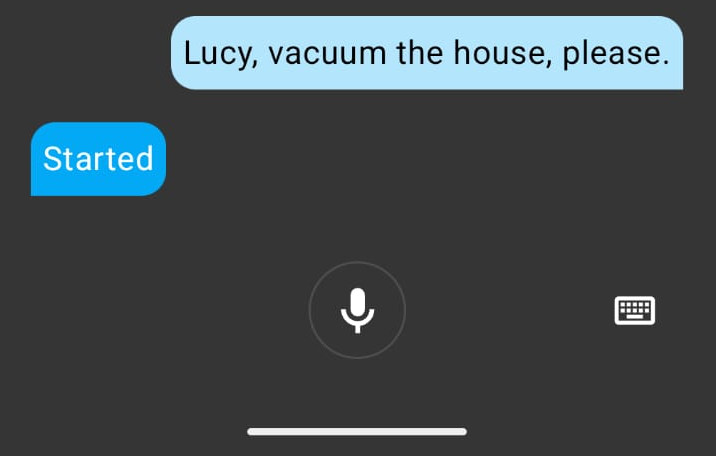
After successfully adding the Roomba, there will be a new panel on the dashboard where you can control the robot and you can also use voice control on the Home Assistant android app, like this (my robot is called Lucy):
Noise
Not much I can do about noise except avoid vacuuming at night and either go out or use noise cancelling headphones.
Disable internet access
With all systems working, I disabled the rule that allowed internet access, then connected to the hell SSID and tested it to make sure access was really blocked.
The app will no longer work but the Roomba is now fully secured from future updates and app breakages.
Conclusion
Really the only thing missing from this setup is the cleaning maps. Im not sure if my firmware is supported by rest980 and at this point, I’m happy to let this one feature slide.
I’m confident I can get a few more years out of my Roomba, and perhaps there will be some more consumer friendly vacuums to buy by then. Otherwise, perhaps maintaining a vintage robot may become the modern equivalent of driving a classic car 😂