 RSS/Atom
Home Assistant MDNS (ZeroConf) Network forwarding on OPNsense
If your home network is split up into VLANs like it should be, you will find that all the handy auto detection stuffs in Home Assistant no longer works and you need to type in IP addresses for devices manually. Also things like casting video to the TV won’t work. This is because mDNS can’t cross subnets.
Fixing this for the whole network on an OPNsense router while preserving VLAN security is surprisingly simple. On the OPNsense web UI:
Step 0: RTFM
Step 1: Install
System -> Firmware -> Plugins
Select and install os-mdns-repeater, then reboot
Step 2: Configure
Services -> mDNS Repeater
EnableListen Interfacesis the networks you want to bridge. Apparently there is a limit of 5 although the UI does not prevent you selecting more. By bridging, we are effectively making a flat networking space for mDNS so that Home Assistant will find devices on other VLANs
Step 3: Firewall
The last thing to do is add firewall rules to allow mDNS traffic where needed. I put the very slack rule:

Which just allows all mDNS traffic to anywhere. You could restrict this further if needed.
Of course, Home Assistant also needs to be able to reach back to the devices it discovers, so this may also require additional rules depending how your network is setup.
Step 4: Save/apply/reboot
After making changes like this, its good to reboot the router so you can be sure settings survive a reboot.
Some devices only send mDNS packets on startup as well, so this is a good time to go around the house rebooting printers etc.
Step 5: Test/enjoy
If everything worked, that’s really all there is to it. A few minutes after rebooting devices, I saw things showing up in Home Assistant -> Settings -> Devices & Services -> Discovered:
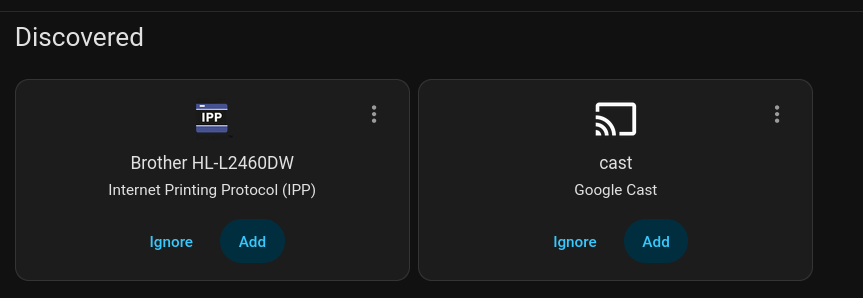
On my phone, my TV was detected in Prime Video and I was able to watch content, whereas I normally have to join a different WIFI SSID.
Finally, on my Linux desktop, avahi-browse also finds devices:
$ avahi-browse -a
+ wlp3s0 IPv4 Brother HL-L2460DW                            Web Site             local
+ wlp3s0 IPv4 Brother HL-L2460DW                            Secure Internet Printer local
+ wlp3s0 IPv4 Brother HL-L2460DW                            Internet Printer     local
+ wlp3s0 IPv4 Brother HL-L2460DW                            UNIX Printer         local
+ wlp3s0 IPv4 Home                                          _home-assistant._tcp local
...
In summary this makes using Home Assistant way simpler and restored casting to TV so that a normal human being can use it.