 RSS/Atom
Rescuing broken kubernetes
After recovering the network from a failed router upgrade by doing a re-flash recently, I found all my kubernetes HA clusters were toast.
To cut a long story short, this happened because the DHCP leases database was reset and they all got new IP addresses, which meant individual nodes (K3S) could not startup.
There were 3 steps needed to recover the clusters, and I can prevent this from happening again very easily:
Solution
Step 1 - Switch back to old IP address
I’m pretty sure my etcd was completely broken. The easiest way I found to get the old IP address was to just search the logs:
sudo journalctl | grep -i dhcp
Which worked on all of my Debian kubernetes nodes.
Note down the IP address, MAC address and hostname, then in your router, create a static lease with the old details. Don’t click apply until you are ready for the next step.
Step 2 - Reboot all nodes
eg, with ansible:
ansible all -i inventories/hosts.yml -b -m ansible.builtin.reboot
Now click apply on your router while the systems are rebooting.
Step 3 - Test access and update if needed
On a cluster node, see if access is now working:
sudo kubectl get nodes
If this worked, you will now see your cluster nodes as usual instead of the some error.
Outside the cluster, you may find your previous credentials now give certificate errors. After checking requests are reaching the right cluster endpoint IP address, there is a good chance the cluster has re-issued itself new certificates. In this case, replace your credentials for .kube/config with a fresh copy from the node and this should fix things.
Agent nodes may have similar issues and find themselves permanently evicted. This happened to me and it was easiest to just delete the agent node from the control plane and reinstall the node as a fresh worker.
Fixed
After performing these steps, my cluster was operational again but this was NOT a fun exercise.
Thankfully this was a pretty empty lab setup. In the real world, 100% there would have been big disruption, crashed pods and customer impact.
I note that my rook/ceph managed to recover itself on its own once IP addresses were fixed, which is outstanding.
Prevention
Basically Kubernetes likes to have static IP addresses, but I like the convenience and flexibility of DHCP, especially when I might want to reconfigure hosts from the router.
Most of my hosts are headless and with only one NIC, so any screw up in static address reconfiguration with say ansible means crawling around with HDMI cables and keyboards to fix.
There is however an easy fix I overlooked in OPNSense: On the far right, there is a + button that adds a static lease.
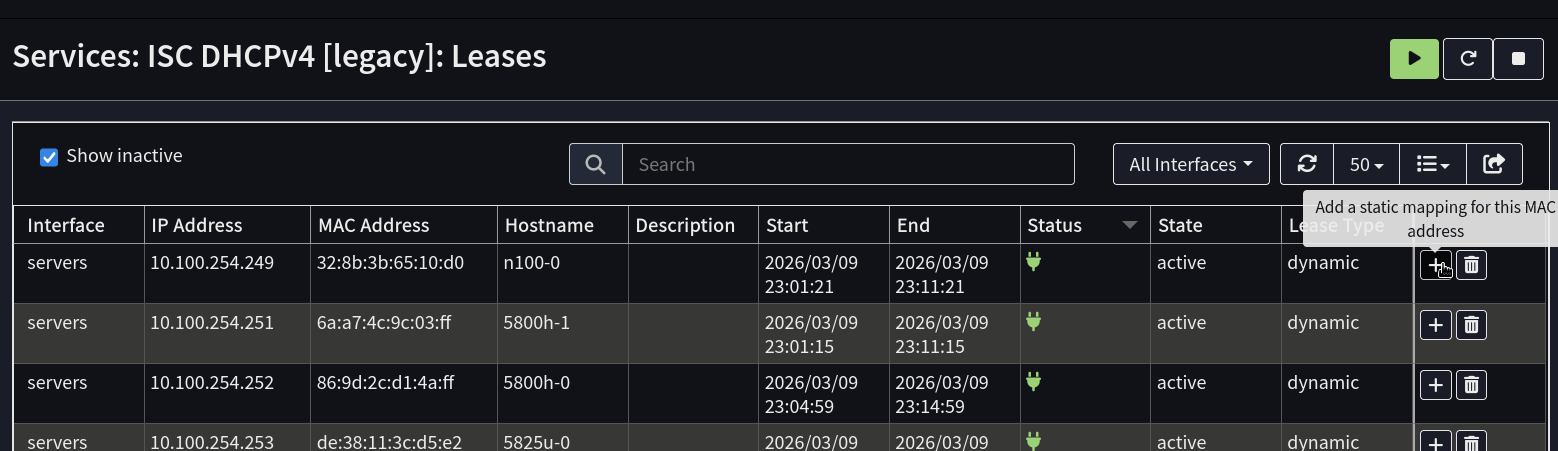
So my new solution is when I’m happy a lab system is up and running nicely, just click the button and add a static lease if Kubernetes is involved.
That way it gets included in backups and if there router need re-flashing, systems should come back online with the right address soon after the router is back online.